
On this page
Traditional bug reporting often creates a significant information gap between users and developers. When a reporter provides a vague description like "the page isn't loading," engineers are forced into a cycle of manual detective work, hunting through logs and requesting reproduction steps. This inefficiency stalls development velocity and allows critical defects to remain in production longer than necessary.
Artificial intelligence is fundamentally changing this dynamic by serving as an automated translation layer. Instead of relying on human technical literacy, modern systems capture high-fidelity environment data and use Large Language Models to generate structured, actionable tasks. This approach, exemplified by TellBack, moves beyond passive collection to active feedback intelligence, enabling teams to close the loop between user friction and code resolution with precision.
The Information Gap in Manual Issue Tracking
The primary bottleneck in software quality assurance is not the fixing of the bug, but the understanding of it. Manual reports frequently lack the technical metadata—such as specific browser versions, console error logs, or the exact sequence of user actions—required to reproduce a failure. This missing context forces developers to spend hours attempting to replicate issues in local environments.
This reproduction crisis has a direct impact on the bottom line. When engineers spend a high percentage of their time triaging context-poor tickets, they have less capacity for shipping new features. Furthermore, high-volume feedback periods, such as new version launches, can overwhelm product managers, leading to a backlog where critical functional errors are buried under minor UI suggestions.
Smart Bug Detection through High-Fidelity Capture
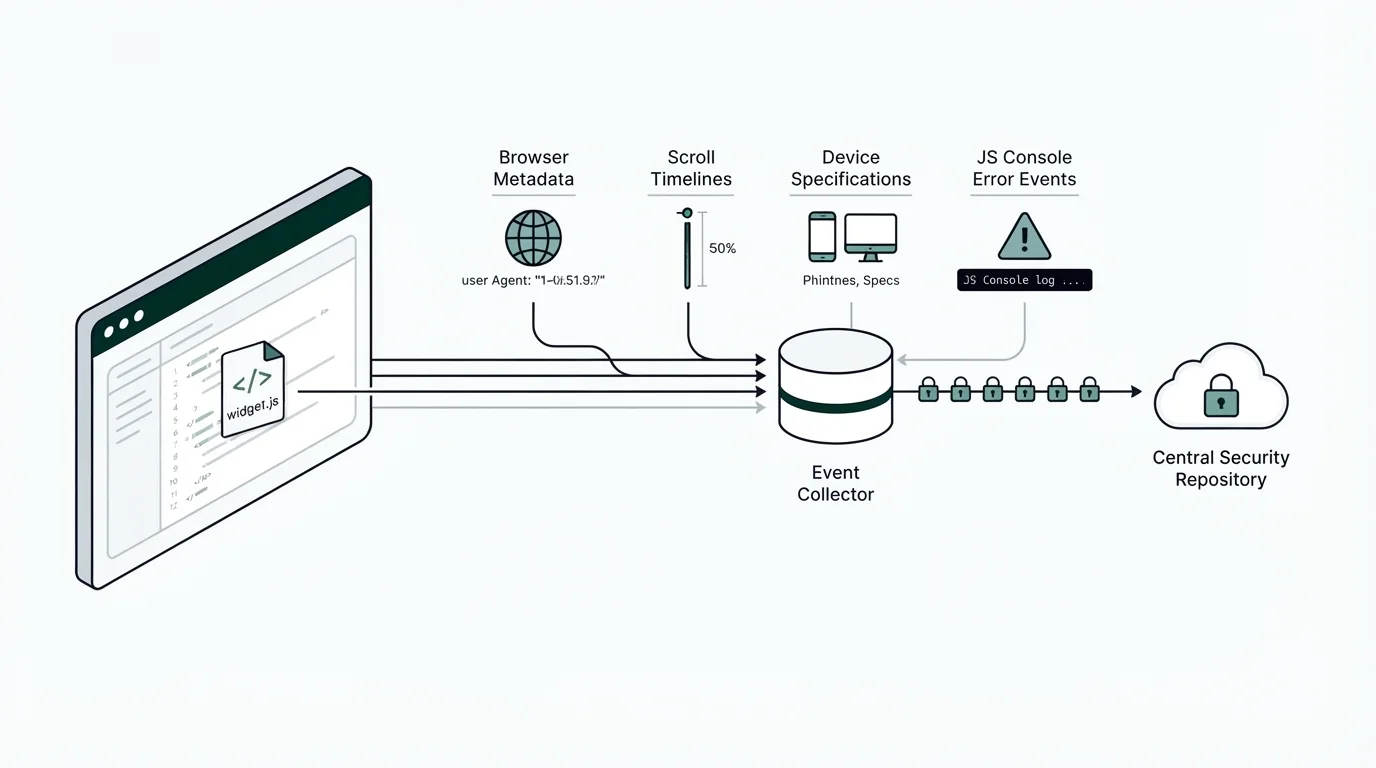
To solve the context gap, modern bug reporting utilizes a client-side layer to monitor user friction signals in real time. TellBack implements this through a JavaScript snippet known as widget.js, which can be deployed on whitelisted origins. This tool automates the collection of essential technical evidence without requiring manual input from the end user.
While the user interacts with the application, the system captures a multi-dimensional snapshot of the environment. This includes device specifications, browser metadata, scroll timelines, and click paths. By monitoring the JavaScript console for error events and taking viewport screenshots, the system ensures that the developer receives a complete technical narrative of the failure. This level of detail transforms a subjective complaint into an objective data set.
From Messy Feedback to Dev-Ready Tasks
Raw technical data is only useful if it is structured correctly for development workflows. TellBack leverages Generative AI using Gemini models via Vertex AI to synthesize multi-modal inputs—including voice notes, screenshots, and logs—into clear tasks. The AI analyzes these disparate signals to identify the root cause and the user's intended outcome.
Instead of a developer receiving a raw list of logs, the AI generates a dev-ready task that includes specific technical selectors and a step-by-step reproduction guide. This automated synthesis removes the need for manual report writing and ensures that every ticket meets a high standard of clarity before it ever reaches the engineering backlog. This process effectively bridges the gap between qualitative user experience and quantitative engineering requirements.
Integrating with Coding Agents and Modern IDEs
The output of AI-driven bug reporting is specifically optimized for the next generation of development tools. For every identified issue, TellBack generates a markdown prompt containing all necessary evidence and acceptance criteria. This prompt is designed for direct use in coding agents like Cursor, Claude Code, or Windsurf.
By pasting these structured prompts directly into an AI-powered IDE, developers can initiate automated code generation for a fix. This creates a seamless workflow where user feedback is captured, analyzed by one AI model, and resolved by another, significantly reducing the time-to-fix for common application errors.
Master client feedback and bug reports
Learn how to efficiently capture, understand, and act on client feedback and bug reports. Get strategies to streamline issue resolution for product teams.
Automated Bug Triage and Feedback Intelligence
Scaling a product requires a triage process that can handle growth without proportional increases in manual labor. AI-powered platforms assist by automatically categorizing and prioritizing incoming reports based on technical severity and user impact. This ensures that developers focus their energy on the issues that most significantly affect application stability.
Collaboration is centralized within a dashboard where developers and managers can view interaction streams and configure project parameters. Teams can manage workspace-level features, adjust allowed origins for security, and toggle between different visitor identity modes. This shared visibility ensures that the entire product team is working from a single source of truth, minimizing duplicate efforts and communication breakdowns.
Implementing AI Feedback Layers in Your Workflow
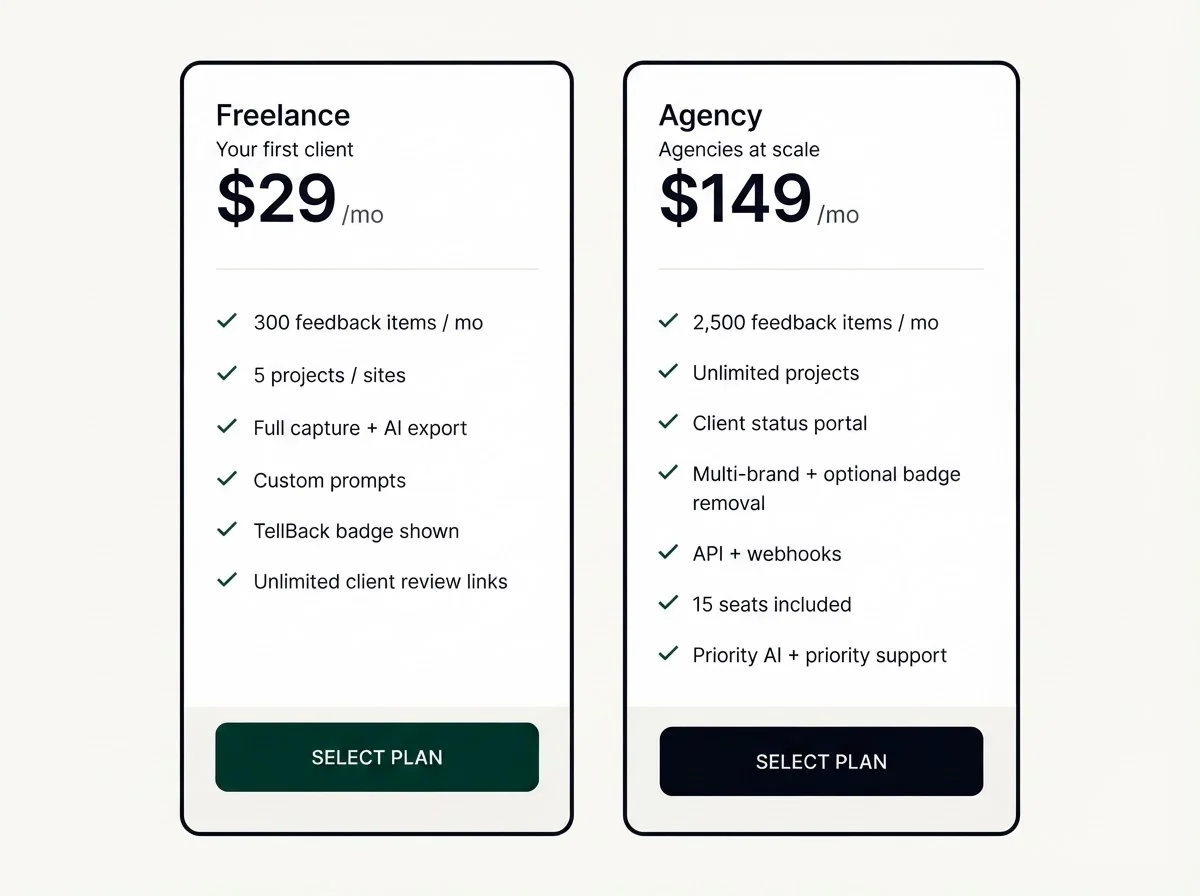
Adopting an intelligent feedback layer is a strategic move for teams looking to maintain high shipping cadences. TellBack offers a tiered pricing model to support different organizational scales. For individual builders, the Freelance plan is available at $29 per month, providing one seat and unlimited projects to streamline client work.
Growing teams may choose the Studio plan at $79 per month, while larger organizations managing multiple client portals can utilize the Agency plan at $149 per month. The Agency tier includes 15 seats, unlimited projects, and advanced features such as webhooks access and higher daily quotas. For enterprise needs, custom configurations are available including SSO, dedicated engineering support, and custom storage retention windows to meet compliance standards.
Frequently Asked Questions
Q: Can I control what data is collected from my users?
Yes. TellBack allows you to set the feedback mode per site. You can choose to collect nothing, page views only, hidden sessions, or full feedback, and you can manage allowed origins to maintain security.
Q: How does the AI process voice notes?
Users can record voice notes to explain bugs verbally. While the system does not create a standalone transcript file, the AI uses the audio content to help draft structured dev-ready tasks and coding-agent prompts.
Q: Does this work with my existing project management tools?
Yes. The system generates markdown prompts that can be pasted into tools like Cursor or Windsurf. Higher-tier plans also offer webhooks for deeper integration into existing workflows.
Q: Are there limits on the number of projects I can track?
Both the Freelance and Agency plans include unlimited projects, though they differ in the number of seats and daily quotas provided.
Q: Is the console data collection safe?
TellBack is designed to capture safe error context. You can configure the system to ensure compliance with your organization's specific privacy and security standards.
The transition to AI-driven bug reporting represents a shift from reactive troubleshooting to proactive feedback intelligence. By automating the capture of technical context and the synthesis of tasks, product teams can eliminate the most time-consuming aspects of QA. The TellBack approach demonstrates that when messy user feedback is combined with sophisticated data collection and LLM analysis, it becomes a high-value asset for development. Implementing these tools is no longer an optional upgrade; it is a necessary step for teams that prioritize velocity, accuracy, and a superior user experience.