
On this page
Every "Cannot Reproduce" tag is a symptom of a failed communication process. In software development, a vague bug report isn't just an annoyance; it is a drain on engineering resources. The time spent by developers hunting for root causes without adequate data is often the single greatest bottleneck in the shipping cycle.
Contextual bug reports solve this by providing a comprehensive snapshot of the system state, user behavior, and environment at the precise moment of failure. Instead of a simple "the button doesn't work," a contextual report bundles technical metadata, console logs, and interaction streams. By shifting from manual descriptions to rich, data-backed reports, teams can significantly reduce their Mean Time to Resolution (MTTR) and maintain product momentum.
Why Context is the Foundation of Effective Bug Reporting
The primary barrier to rapid bug resolution is the "reproduction gap." When a developer receives a report lacking context, they must spend hours attempting to recreate the user's specific environment and sequence of actions. This back-and-forth communication creates operational friction and delays critical patches.
Contextual bug reports act as a complete narrative for the developer. By including environmental details—such as the exact browser version, operating system, and viewport dimensions—reporters eliminate the guesswork. This level of detail is particularly crucial for responsive design issues or browser-specific JavaScript execution errors that are impossible to diagnose with a text description alone.
Beyond speed, context improves accuracy. A well-documented report ensures that the developer fixes the actual underlying issue rather than a symptom. It also helps prevent "bad-fix injections," where a developer inadvertently introduces new bugs because they didn't fully understand the original execution state.
The Core Elements of a Contextual Bug Report
A high-quality report should provide a 360-degree view of the defect. While a clear title and description are essential, the technical context is what makes a report "dev-ready." Organizations following QA best practices typically ensure every report contains several critical components.
1. Precise Environmental Metadata
Bugs are often environment-dependent. A contextual report should automatically capture the user's browser metadata, OS version, and screen resolution. For web applications, knowing the exact URL and the state of the window at the time of the error can reveal layout shifts or resource loading failures that a simple screenshot might miss.
2. The Interaction Stream
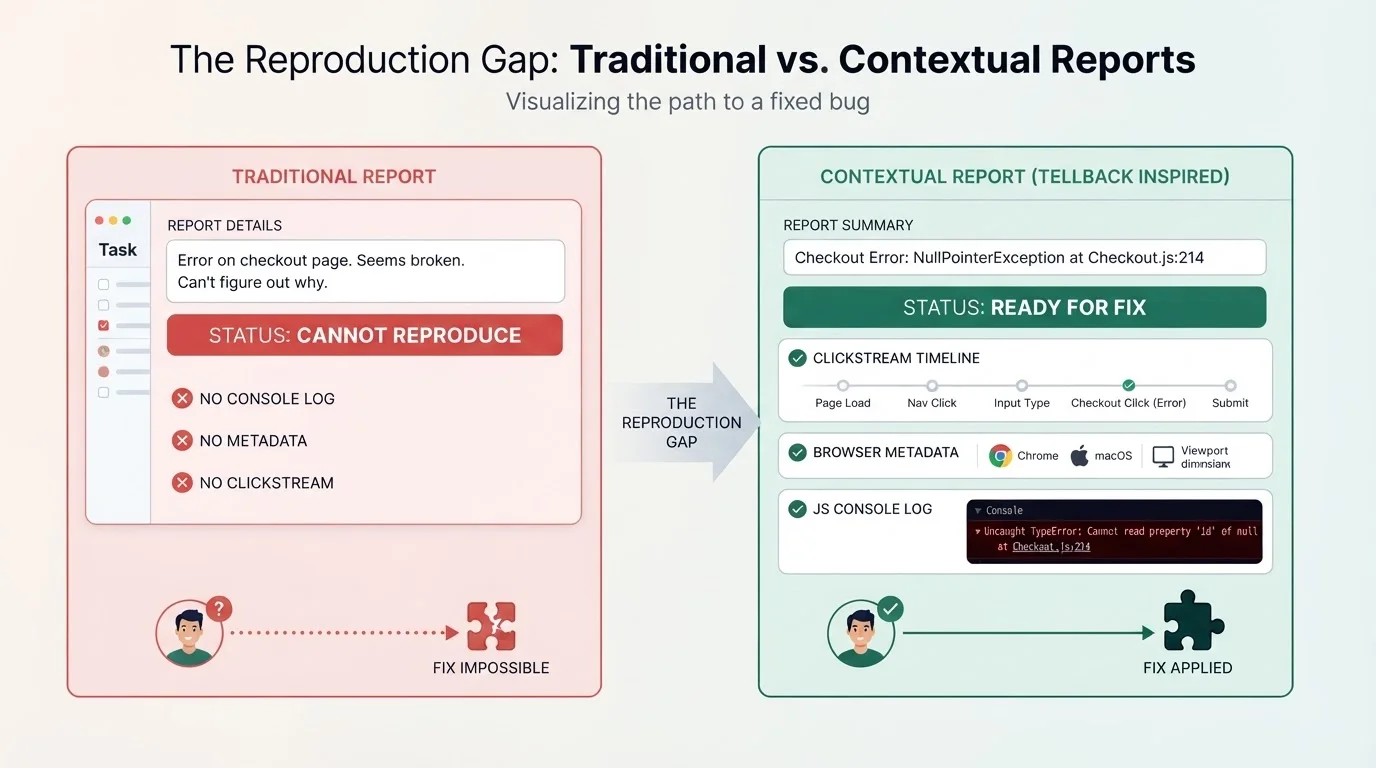
Static steps to reproduce are often incomplete because users forget the minor clicks that led to the crash. Capturing an interaction stream—a chronological log of clicks, scrolls, and navigation events—allows developers to trace the user's path perfectly. This visual timeline is often more reliable than a manual list of steps.
3. Technical Logs and Error Context
Raw technical data is the most direct path to a fix. A contextual report should bundle browser console logs, JavaScript error events, and network request statuses. Providing a stack trace alongside the user report allows a developer to move straight to the code file and line number responsible for the failure.
How TellBack Automates the Context Capture Loop
Manual bug reporting is prone to human error and omission. TellBack streamlines this by functioning as an AI-powered feedback intelligence layer that transforms messy feedback into structured, dev-ready tasks. Rather than asking users to fill out long forms, TellBack allows them to submit reports with full context automatically attached.
TellBack provides a client-side JavaScript snippet that captures clicks, scroll timelines, device specifications, and JS console error events. This data is paired with screenshots and voice notes, allowing users to explain the friction they are experiencing verbally. By providing verbal explanations to complement visual evidence, TellBack reduces the ambiguity that often plagues text-only reports.
For teams managing multiple environments, TellBack offers granular control, letting users collect nothing, page views only, hidden sessions, or full feedback on a per-site basis. This ensures that the right amount of context is captured without compromising data privacy or application performance.
Bridging the Gap Between Reports and AI Coding Agents
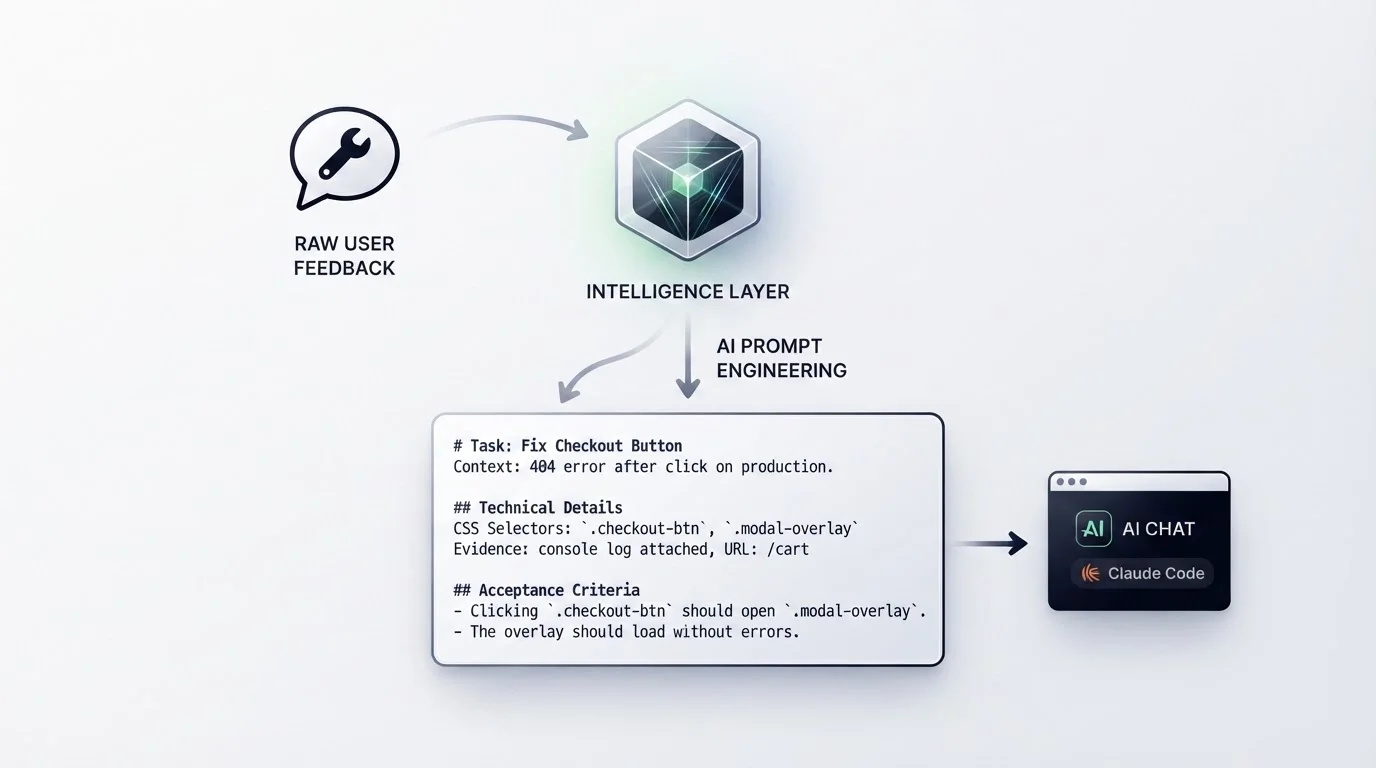
The most significant evolution in bug resolution is the rise of AI coding agents like Cursor, Claude Code, and Windsurf. However, these agents are only effective if they have high-quality context to process. A generic bug report makes for a poor prompt, often leading to hallucinations or incorrect code suggestions.
TellBack solves this by generating coding-agent prompts directly from captured feedback. Each task created in TellBack ships a markdown prompt complete with CSS selectors, visual evidence, and acceptance criteria. Developers can paste this context directly into their AI agent, enabling the agent to understand the technical environment and the specific DOM elements involved. This workflow transforms bug reporting from a documentation task into an automated fix-generation process.
Measuring the Impact of Improved Reporting
To evaluate the effectiveness of moving to contextual reporting, product teams should track specific performance metrics. These indicators help quantify the ROI of better processes and highlight remaining bottlenecks in the QA workflow.
Mean Time to Resolution (MTTR)
This is the average time elapsed from a bug being reported to the fix being deployed. By providing full context upfront, teams often see a significant reduction in MTTR because the investigation phase—which typically consumes the largest portion of the bug lifecycle—is streamlined. Developers can jump straight into the code rather than spending time on discovery.
Cannot Reproduce (CNR) Rate
A high CNR rate indicates a context deficit. By capturing interaction streams and environment metadata automatically, the CNR rate should drop toward zero. If a developer can see exactly what the user did and the console errors that occurred, reproduction becomes a non-issue.
Handoff Frequency
Monitor how many times a bug report moves back and forth between QA and Engineering. Contextual reports aim for first-touch resolution, where the developer has everything they need to start coding without asking clarifying questions or requesting more screenshots.
Frequently Asked Questions
Q: What is the biggest mistake in bug reporting?
The biggest mistake is assuming the developer has the same environment as the user. Without environment metadata, a developer may never be able to replicate a bug that only occurs on specific browser/OS combinations.
Q: How do voice notes improve bug reports?
Voice notes allow users to describe the 'why' and 'how' of their friction in a way that text often fails to capture. TellBack allows users to record and submit these directly from a feedback widget to complement screenshots.
Q: Can I use TellBack for large-scale projects?
Yes. TellBack includes features such as SSO, SLA agreements, custom DPAs, and unlimited projects. It also supports full white-label configurations for agencies.
Q: How much does TellBack cost for individual builders?
TellBack offers a Freelance plan for $29 per month, which includes the core context capture features needed for streamlined reporting. For larger teams, the Studio plan is $79 per month and the Agency plan is $149 per month.
Effective bug reporting is the difference between shipping features and drowning in technical debt. By prioritizing contextual bug reports, teams eliminate the reproduction gap and empower their developers to work at peak efficiency. Tools like TellBack further bridge this gap by automating the capture of technical metadata and turning messy feedback into structured prompts for the next generation of AI coding agents. Moving toward a context-first workflow is the most direct way to reduce bug resolution time and build a more stable, reliable product.