
On this page
In software development, few things are as costly as a vague bug report. When a user submits a note saying "the button is broken," they kick off a chain reaction of unproductive work. Developers must pause their current tasks to ask for clarification, QA engineers struggle to replicate the issue, and project managers lose time triaging ambiguity. Dev-ready feedback eliminates this friction by ensuring every report is actionable, contextual, and complete from the moment it is submitted.
Achieving this state manually is difficult and time-consuming. However, by using an AI-powered feedback intelligence layer, teams can bridge the gap between messy human input and structured technical requirements. This article explores how to transform unstructured feedback into dev-ready tasks, utilizing TellBack’s AI capabilities to streamline the journey from issue identification to final resolution.
The High Cost of Unstructured Feedback
Unstructured feedback—informal, spontaneous, and often lacking technical context—is a significant drag on engineering velocity. A large portion of a developer's day is often not spent writing code, but rather gathering the context required to understand a reported problem. When feedback arrives as a simple screenshot or a one-line comment, it lacks the technical metadata necessary for a swift fix.
For an individual developer, an urgent but vague bug report can trigger a significant context-switching penalty, interrupting deep work and delaying project timelines. When feedback lacks specific data points like browser versions, console errors, or reproduction steps, it forces developers into a cycle of "Cannot Reproduce" rejections. This cycle creates friction between product teams and engineering, as the lack of evidence makes it impossible to validate or address the user's pain point effectively.
Defining the 'Dev-Ready' Standard
To move past the limitations of unstructured input, teams must adopt a "dev-ready" standard. Feedback is considered dev-ready when a developer can begin working on it immediately without asking follow-up questions. This requires a specific set of criteria to be met for every submission to ensure total clarity.
First, a report must offer reproducibility, providing a clear sequence of steps to trigger the bug from a known starting state. Second, it needs environmental context, including the operating system, browser version, device type, and specific page URL. Third, technical evidence must be present, such as automated captures of JS console errors, click paths, and scroll timelines. Finally, the report should include visual documentation like screenshots or recordings to remove ambiguity about UI glitches, alongside a precise statement of expected vs. actual behavior.
Flexible Collection Strategies
TellBack facilitates the dev-ready standard by allowing teams to configure their collection strategy per site. You can choose to collect nothing, page views only, hidden sessions, or full feedback. This flexibility ensures you capture the high-fidelity data needed for critical bugs while maintaining a lightweight experience for minor UI suggestions or general user signals. By setting these modes at the workspace level, teams can balance data depth with user privacy and site performance.
TellBack AI: Transforming Raw Input into Actionable Tasks
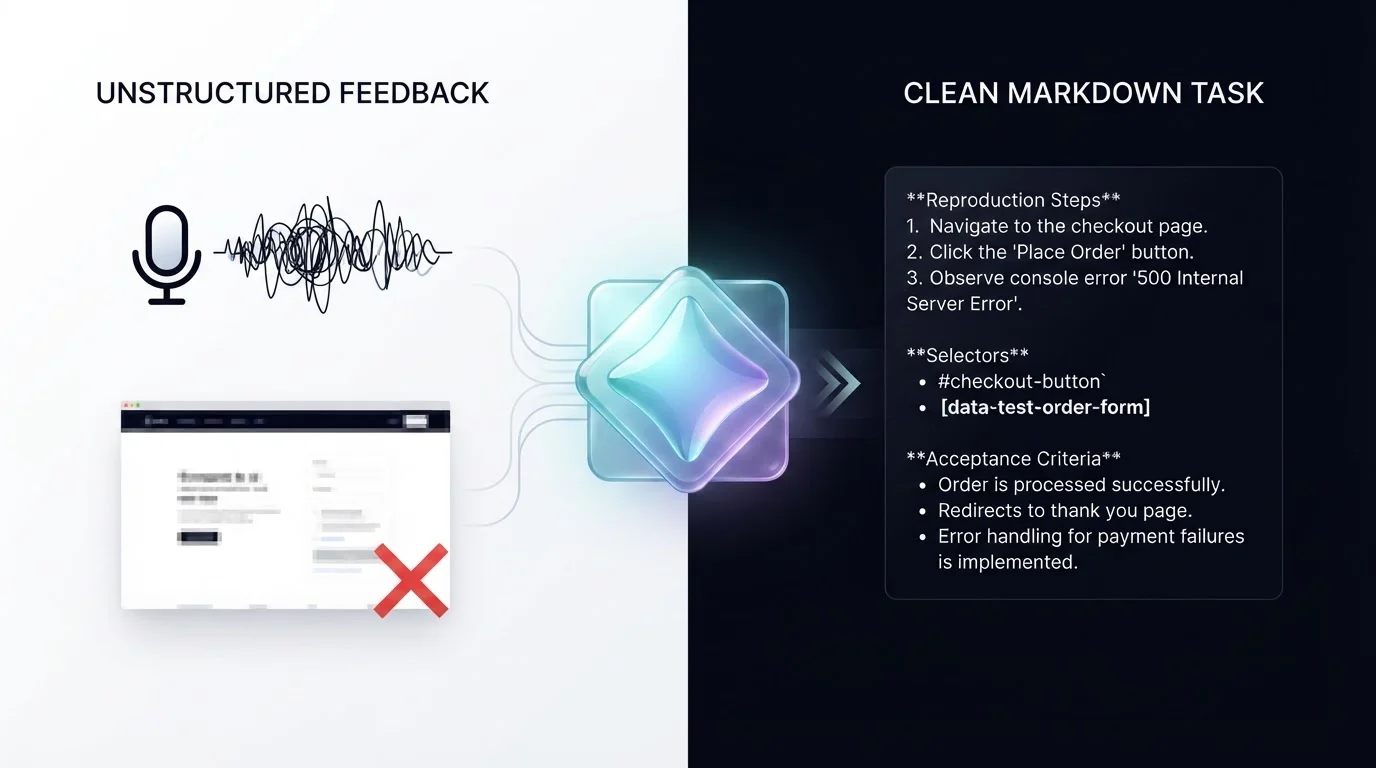
The most significant hurdle in feedback management is the manual labor required to structure raw data. TellBack addresses this by integrating with Generative AI using Gemini models via Vertex AI to parse visitor feedback into structured tasks automatically. This removes the need for manual triage and helps developers move straight to implementation.
When a user records a voice note or submits a screenshot, TellBack's AI engine analyzes the input alongside the captured technical metadata. It identifies the specific UI element affected and maps out the user’s actions leading up to the friction point. This transformation turns a verbal complaint into a markdown-formatted task that includes selectors, evidence, and clear acceptance criteria. By automating the triage and preparation phases, teams can reduce the time spent on clarification from hours to minutes.
Empowering AI Coding Agents
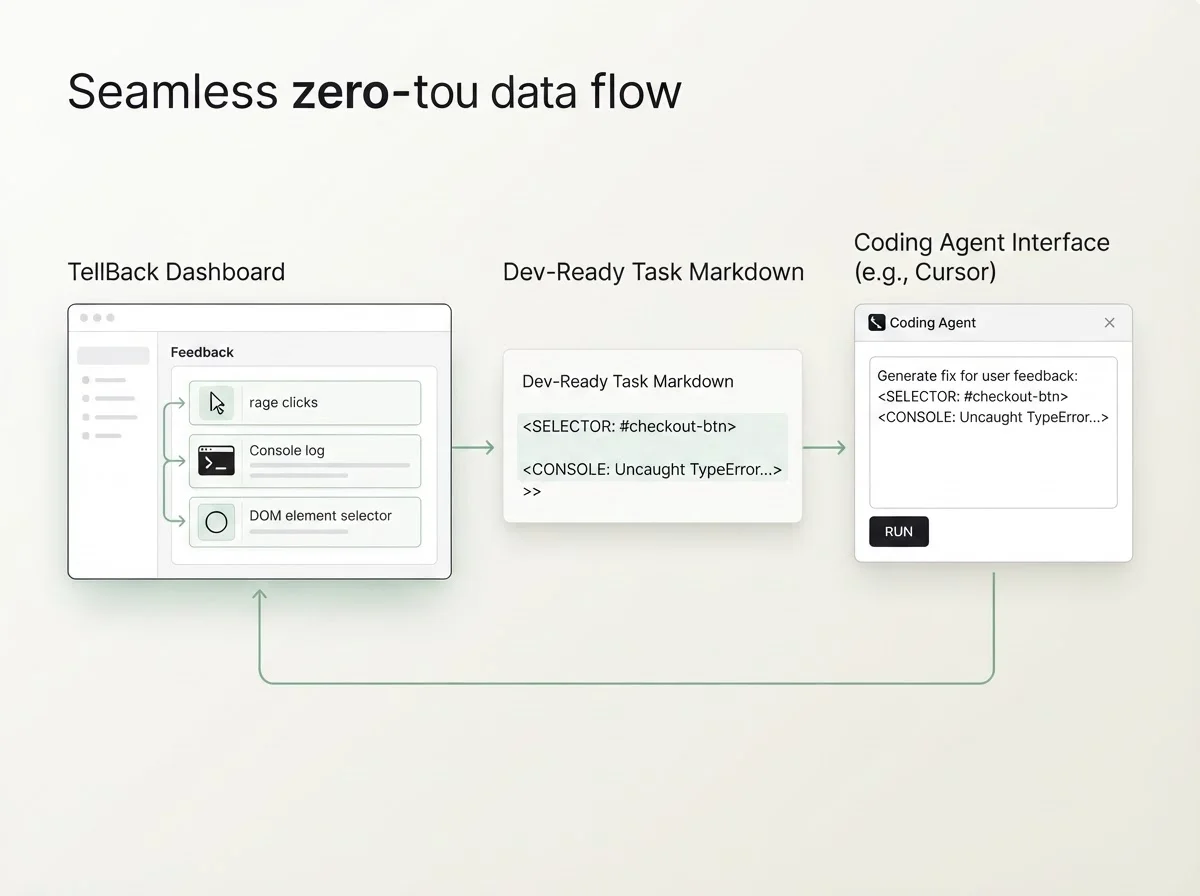
As development workflows evolve, many teams are now utilizing AI coding agents like Cursor, Claude Code, or Windsurf. These agents require highly specific, context-rich prompts to function effectively. TellBack is designed to support this shift by generating coding-agent prompts directly from feedback.
Instead of manually writing instructions for an agent, developers can paste the AI-generated markdown from TellBack. This markdown ships with all the technical context the agent needs—including selectors and event logs—to identify the root cause and suggest a fix. This creates a seamless loop from user feedback to automated code generation, allowing teams to ship fixes faster than ever before.
Step-by-Step: From Feedback to Fix
Implementing a dev-ready workflow with TellBack follows a structured progression designed to minimize developer overhead and maximize technical accuracy. This process ensures that no signal is lost and every report is enriched with data.
- Contextual Capture: The TellBack
widget.jssnippet captures clicks, device specs, and console errors in the background. Users can supplement this with voice notes and screenshots directly through the embedded widget. - AI Parsing: Raw inputs are processed by the Gemini-powered AI, which extracts the core issue and enriches it with the captured browser metadata.
- Task Structuring: The system generates a task summary that includes reproduction steps, environmental details, and links to session recordings.
- Workflow Integration: Dev-ready tasks can be integrated into project management tools, ensuring they enter the existing development queue without manual entry.
- Iterative Optimization: Teams can regularly review the quality of AI-generated tasks and adjust workspace-level features, such as Allowed Origins or Feedback Modes, to refine the data collection process.
Choosing the Right Plan for Your Workflow
TellBack offers several tiers tailored to different team sizes and project requirements. Evaluating these options depends on your seat count and the complexity of your client work. All plans focus on turning feedback into dev-ready tasks while scaling with your business needs.
For independent developers, the Freelance plan ($29/month) includes 1 seat and access to a single project. Growing teams may prefer the Studio plan ($79/month), which is designed to handle multiple projects simultaneously. Professional agencies managing diverse client portfolios typically choose the Agency plan ($149/month), which includes 15 seats and support for unlimited projects. For large organizations, Enterprise options provide advanced features like SSO, custom storage retention windows, dedicated engineering support, and full white-label configurations to maintain brand consistency.
Transitioning to a dev-ready feedback model is not just about efficiency; it is about protecting your team's most valuable asset—time. By leveraging AI to handle the heavy lifting of context gathering and task structuring, you eliminate the "maintenance tax" that slows down product delivery.
TellBack’s AI transformation enables teams to capture the page context, record voice notes, and turn every user signal into a precise development task. Whether you are a solo freelancer or a large-scale agency, automating the feedback loop ensures that your developers spend less time asking "what happened?" and more time shipping high-quality code. Start building a more responsive development cycle today by integrating dev-ready feedback into your core workflow.
Frequently Asked Questions
Q: How does TellBack capture technical context without slowing down my site?
TellBack uses a lightweight JavaScript snippet that enforces specific duration caps and rate-limits to maintain application performance while managing infrastructure usage.
Q: Does TellBack integrate with AI coding tools like Cursor?
Yes. Every task generated by TellBack can be exported as a markdown prompt containing selectors and evidence, which can be pasted directly into coding agents like Cursor, Claude Code, or Windsurf.
Q: Can I customize the level of data collected for different projects?
Yes. TellBack allows you to set Feedback Modes per site, ranging from collecting nothing or page views only to capturing full hidden sessions and active user feedback.
Q: What happens if a user submits a voice note?
TellBack captures the audio report and includes it as part of the feedback item. While it does not create a standalone transcript field, the AI uses the audio content to enrich the generated dev-ready task and coding-agent prompt.